Kepler
A pedal bass that orbits your chords.
What it does
Kepler reads the chords on one track and writes a bass line on another. It picks the note that sits under all of them without rubbing, so no minor 2nds or major 7ths against any chord tone, and holds it as a pedal. Or it follows the roots, or does both: holds the pedal and drops to the root when the chord changes.
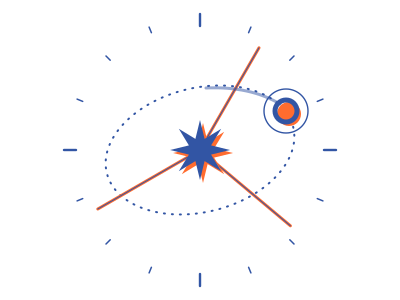
The rhythm comes from a planet going round a star. Each time it crosses a beam, a note plays. Change the speed, the number of beams and the cycle length and you get anything from straight offbeats to patterns that take four bars to come round. A one-bar mask keeps the bass out of the way of your kick.
The bass is written into an ordinary MIDI clip, so Live plays it with exact timing. When you like it, freeze the clip and edit it like any other. I built Kepler for the bit of a track where the chords are down and the bass is a chore.
What's in it
- Pedal, Root or Hybrid: hold the note that clashes least, follow the roots, or both
- Orbit rhythm: cycle length, speed, 1 to 4 beams, skew, phase, spark and gate
- A mask you draw, so notes keep off the kick
- Freeze clip, then edit it by hand
- Two devices: the MIDI effect with its orbit display, and a MIDI Generator for a clip's Generate tab
- 8 presets and a one-page manual
Hear it
You'll need
- SoftwareAbleton Live 12 Suite, or Live 12 Standard with Max for Live
- ComputerMac or Windows
- Tested on
- How it goes inTwo devices: a MIDI effect for the bass track, and a MIDI Generator for a clip's Generate tab. How to install
- Good to knowIt needs chords in a MIDI clip; it doesn't listen to audio. It plays one bass note at a time.
Yours to keep, with presets and a one-page manual. Updates come by email through Gumroad. Or get all three together.
Hear about new devices
An email when something new is out, or a device gets a big update. Not often, and you can leave any time.
You'll get an email to confirm it's you. Sent with MailerLite; see Privacy.